Website builder for small business
Your businessneeds a website.Not another project.
Start from a finished design made for your kind of business. Make it yours in a real visual editor, use WEB4 AI when you want help, and publish to your own domain when you’re ready.
Founding Access — $49 one-time. 1,000 starter WEB4 AI credits included.
Additional AI usage and optional managed hosting are separate.
Free to explore: browse designs and try the editor. See how it works.

01Restaurant & food· Restaurant
Real WEB4 designs. Every one opens in the editor as your site.
01Start from something finished
Pick the business. Pick the design. Make it yours.
WEB4 is a website builder for small business owners who’d rather choose than create. Every design is a finished website with real structure, type and photography. Pick your kind of business and look through them.
Menus change. Events change. Photos change.
Restaurant & food
Restaurant
Restaurant
Bakery
Coffee Shop
Wine Bar
Catering
Don’t see your business? There are hundreds more. Browse all designs.
02Why small businesses get stuck
The website isn’t the business.
But it keeps becoming a project.
Your business is already hard enough. Then the website arrives, and with it a list of jobs that have nothing to do with running it.
- Staring at a blank page
- Writing every word from scratch
- Hunting for photos
- Choosing a layout
- Learning a new builder
- Waiting on a freelancer
- Waiting on revisions
- Paying for every small change
- Another monthly software fee
Designers and agencies do wonderful work, and some businesses need exactly that. Many simply don’t need the overhead of a custom web project to say who they are and how to reach them.
- 01Pick a finished design.It already looks professional.
- 02Change what matters.Your name, offers, photos and prices.
- 03Publish.Put the business online.
03The starting point
Don’t start with a blank page.
With a blank canvas, the website builder is only the first job. WEB4 gives you hundreds of finished designs across industries and styles, with motion and interaction already built in. Preview before you choose, then open the exact design in the editor.
A blank page
Start here
- Pick a layout
- Write the headline
- Find the photography
- Design the sections
- Make it look professional
Every decision is yours before anything looks like a website.
A finished WEB4 design

- Pick a layout
- Write the headline
- Find the photography
- Design the sections
- Make it look professional
- Already in the design. You change the details.
- Real HTML
- Each design is a working website, not a flat image.
- Many industries
- Restaurants, salons, clinics, consultants, shops and more.
- Preview first
- Look at the real site before you commit to anything.
- Opens as yours
- The exact design lands in the editor, ready to change.
04How you get started
Choose the website first. Create the account second.
You see the value before you’re asked for anything. The design you pick is waiting for you in the editor after you sign in.
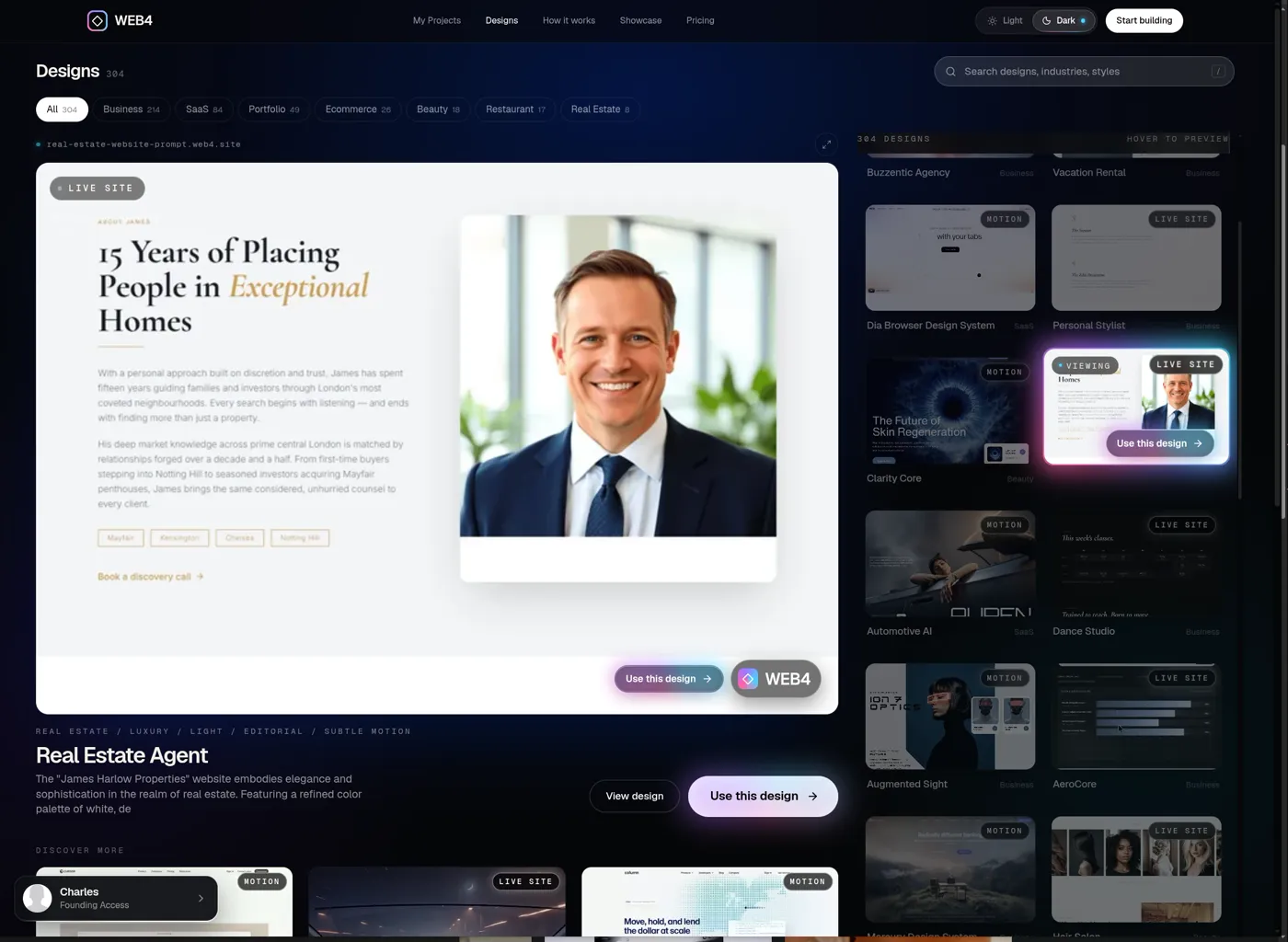
01
Browse designs
Preview finished business websites in motion. No account needed to look.
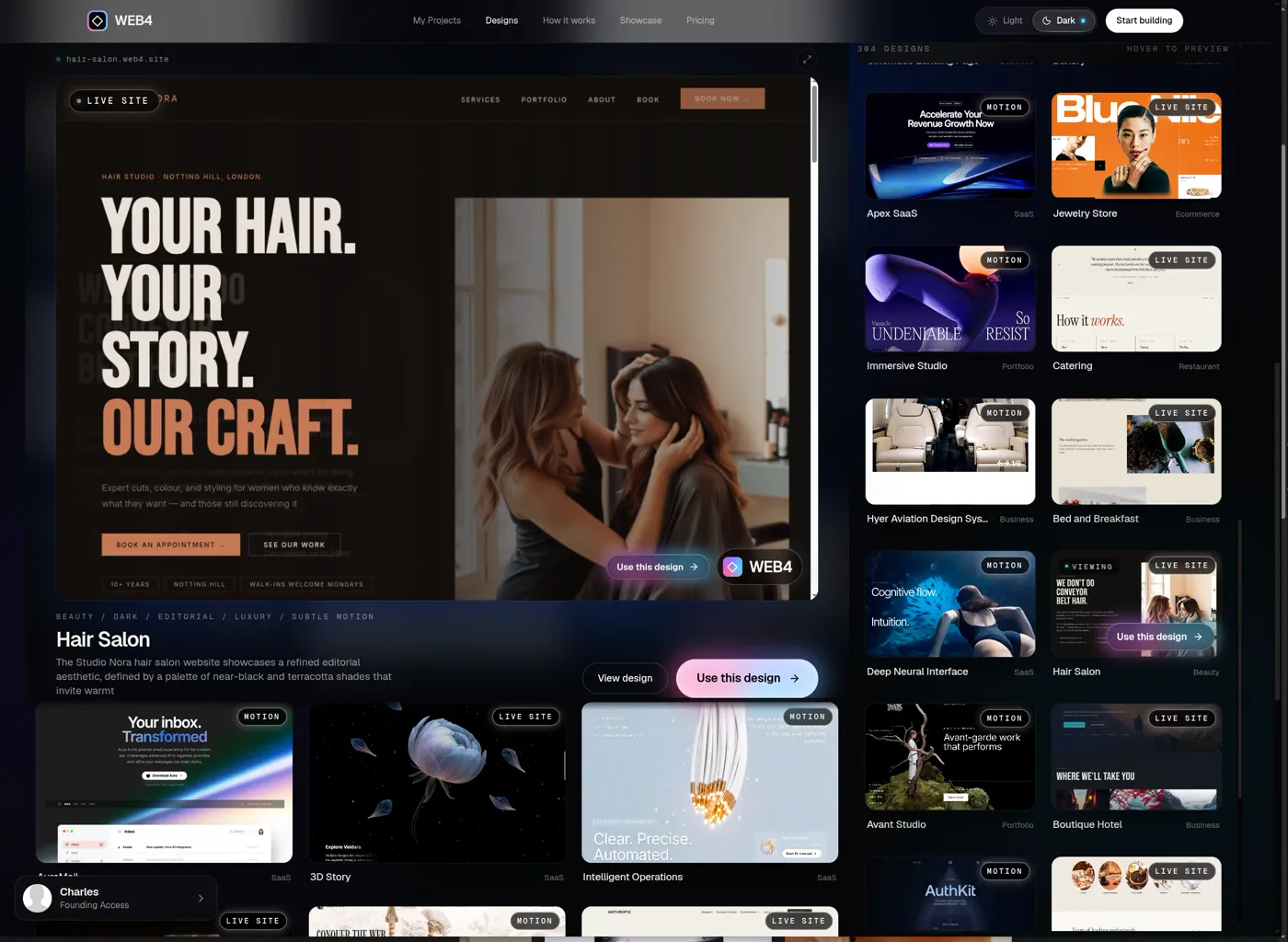
02
Preview one
Open any design on its own page and look at the real site, top to bottom.
- Use this design →
03
Use this design
One button. The design you chose travels with you through sign-in.
- Continue with Google
04
Sign in with Google
You already picked your site. Sign-in is just how WEB4 saves it for you.
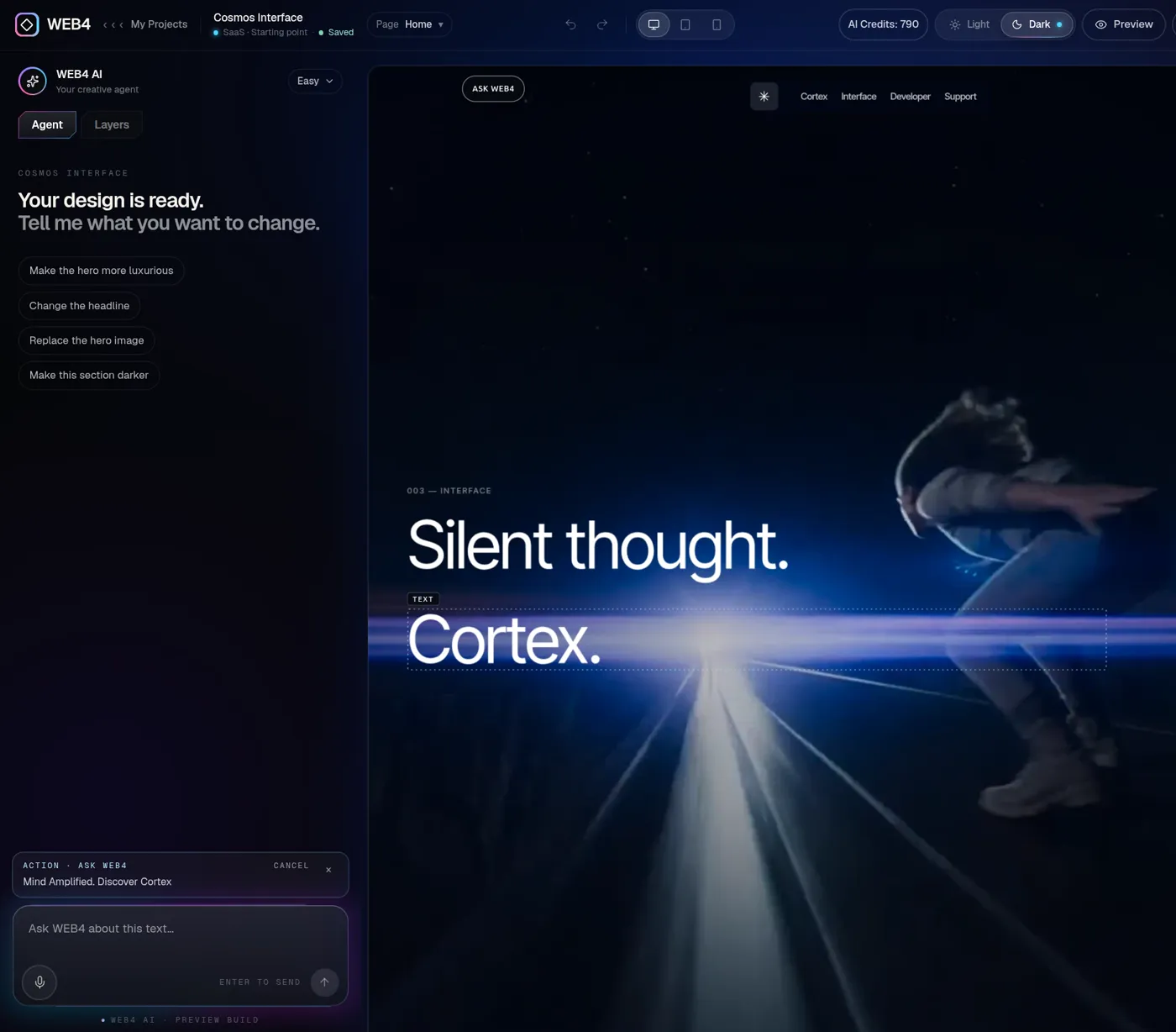
05
Your exact design opens
It lands in the real editor, ready to change, with your choice waiting.
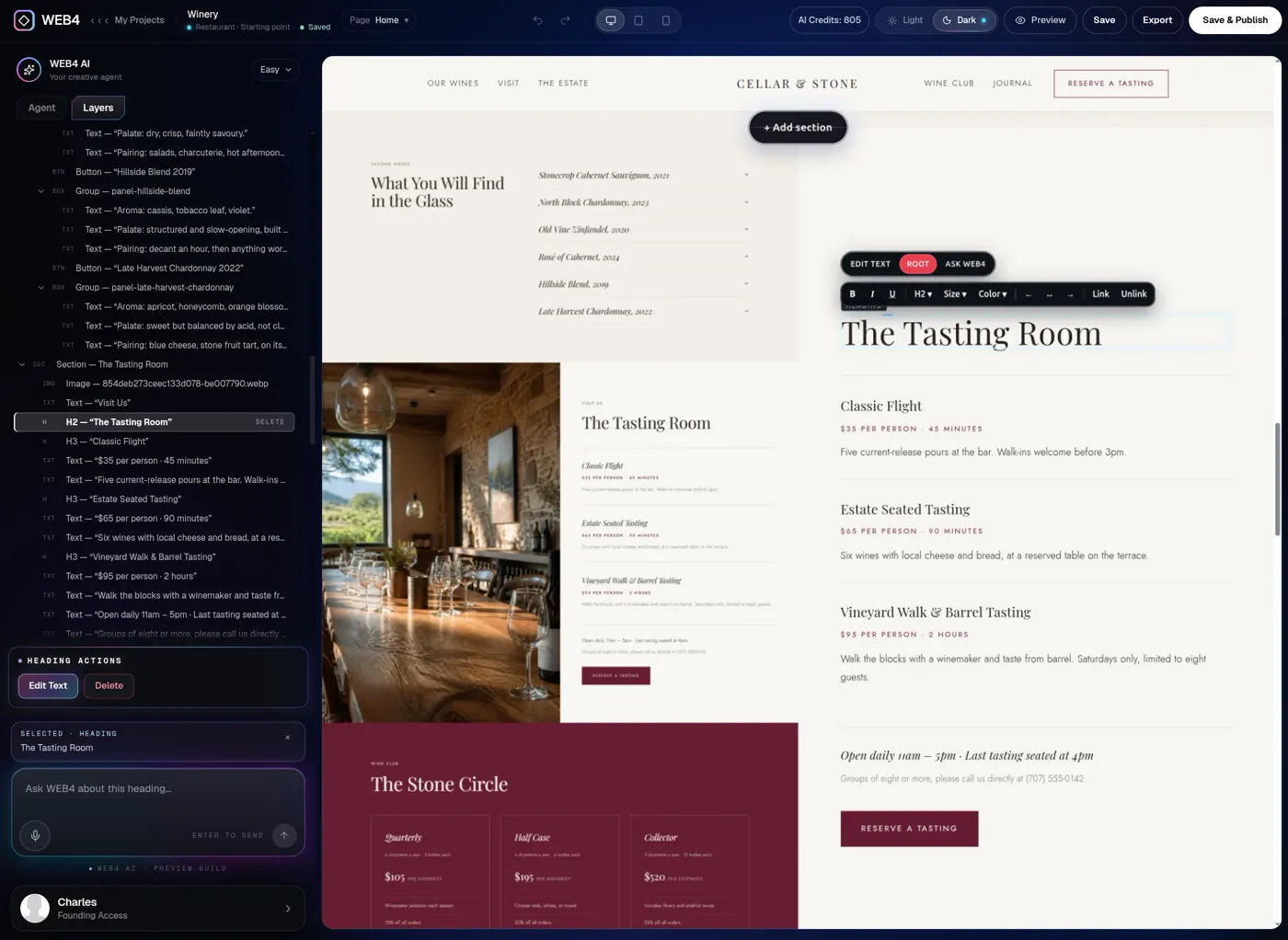
06
Start changing it
Click text, swap images, open Layers. Free to explore, with up to two saved projects.
No account needed to look around.
05The real editor
Your business changes. Your website should be easy to change too.
You’re not locked into a generated screenshot. It’s a visual website builder with no code: click what you want to change and change it. No developer ticket required.
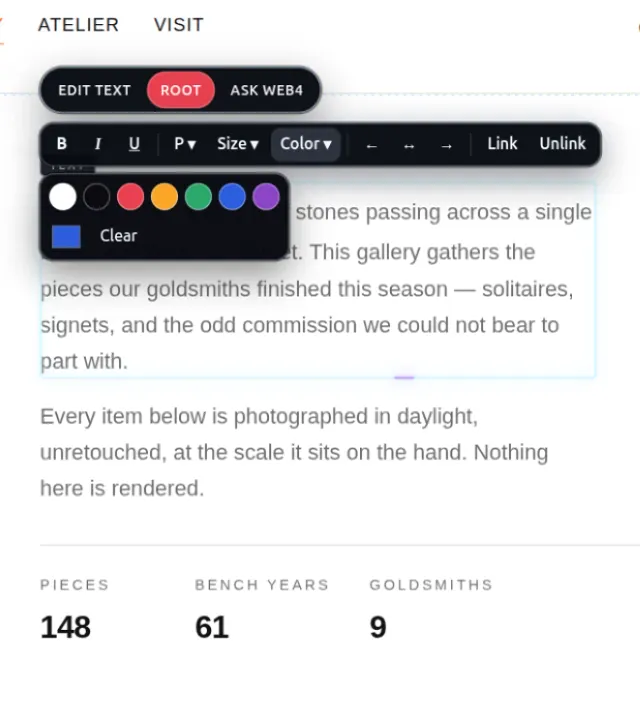
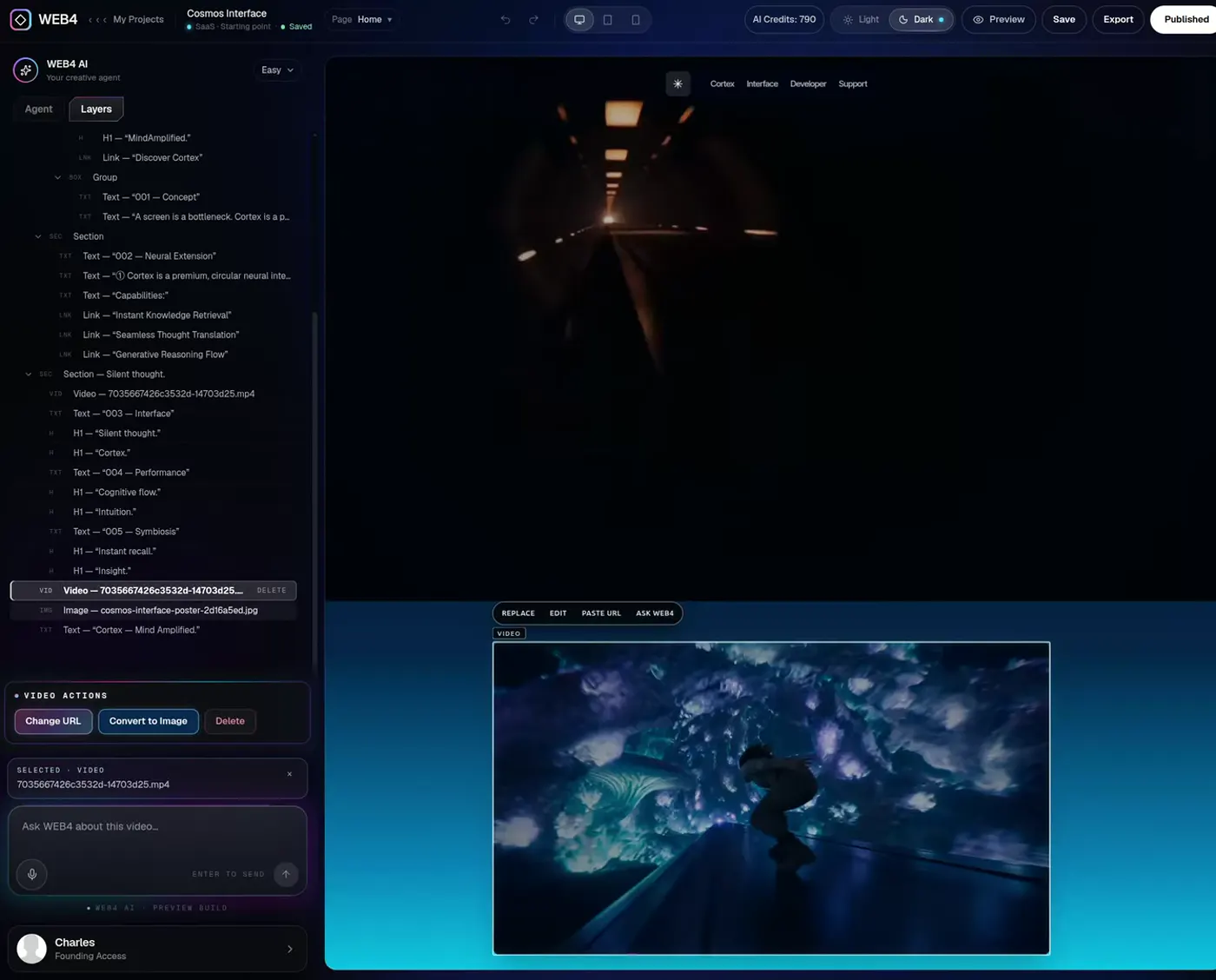
A real WEB4 editor screen, not a mockup.
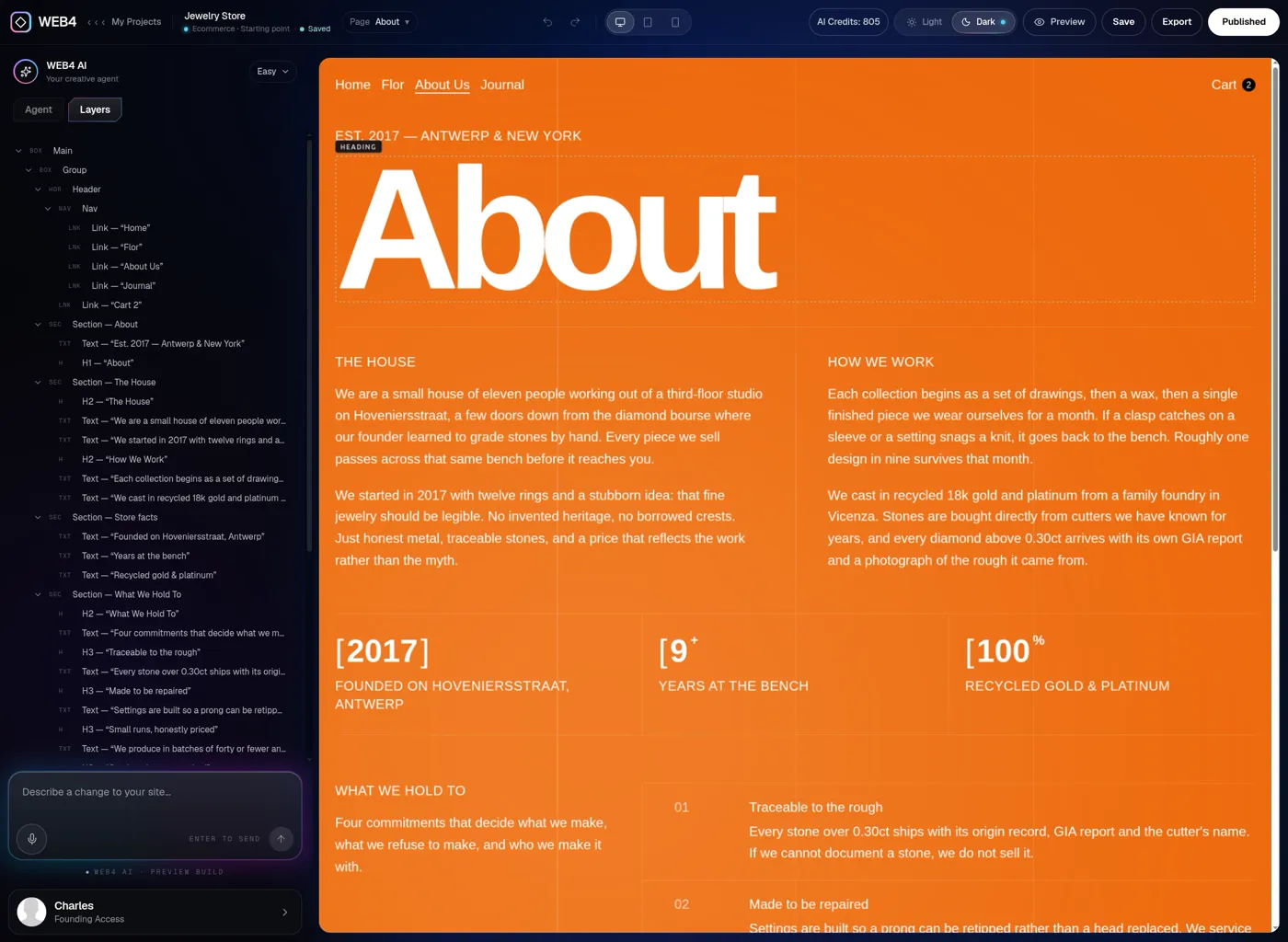
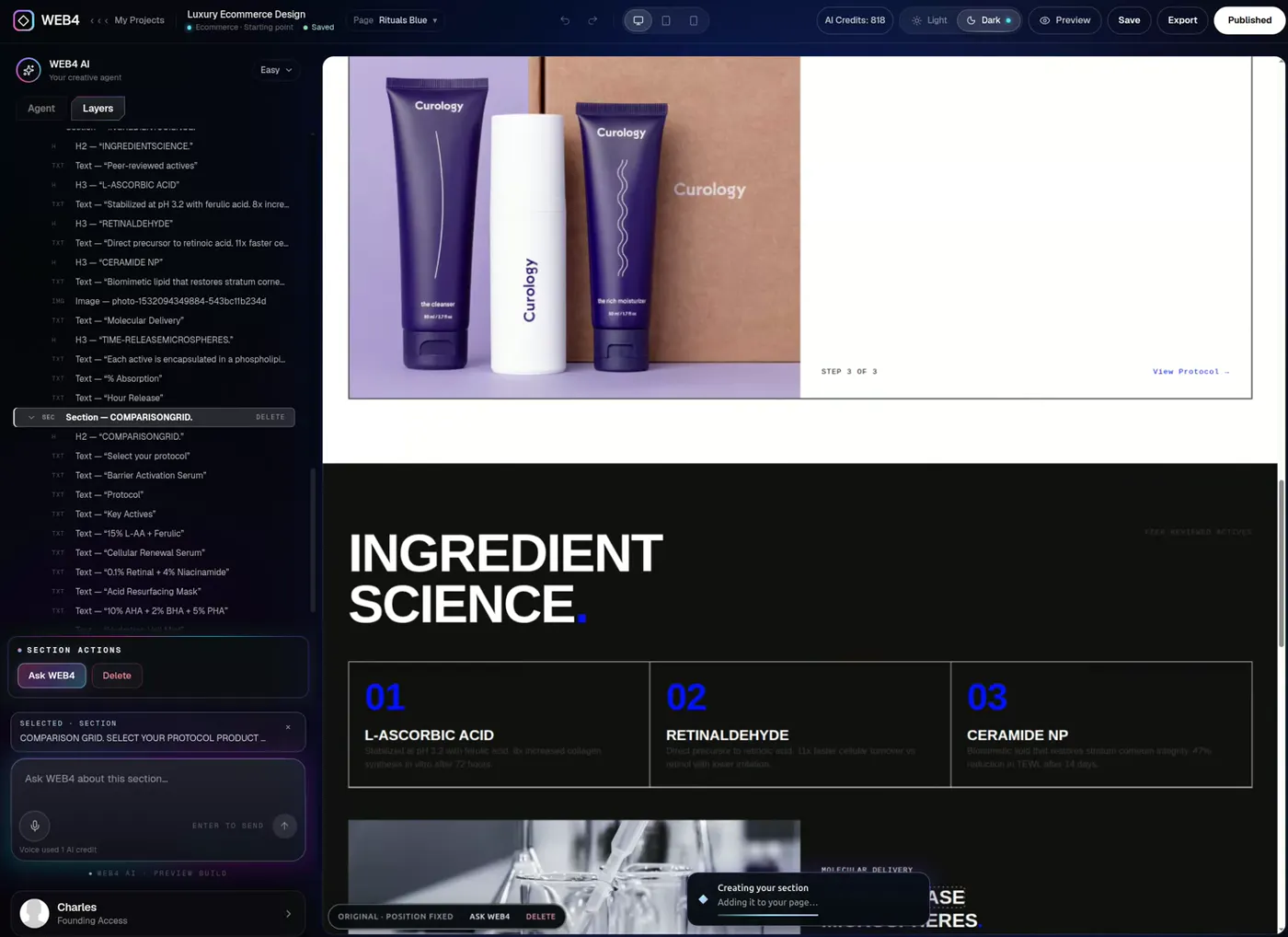
Inside the editor
- Layers tree: every element on the page in one list
- Click an element to select it on the page
- Inline text editing
- Image and link controls
- Move or delete whole sections
- Desktop, tablet and phone preview
- Saved projects you can reopen
The editor is designed for a tablet, laptop or desktop. Your visitors will see the finished website on any phone.
06AI, when you want it
Do it yourself, or tell WEB4 what you want.
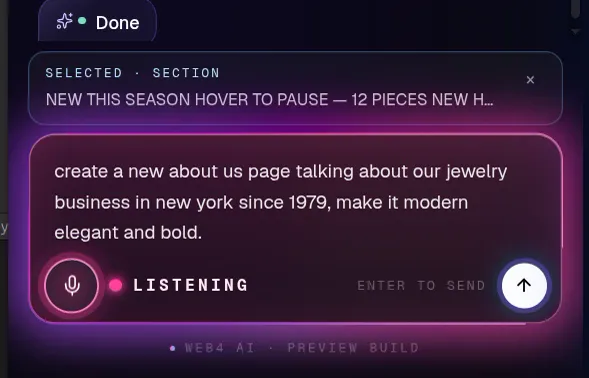
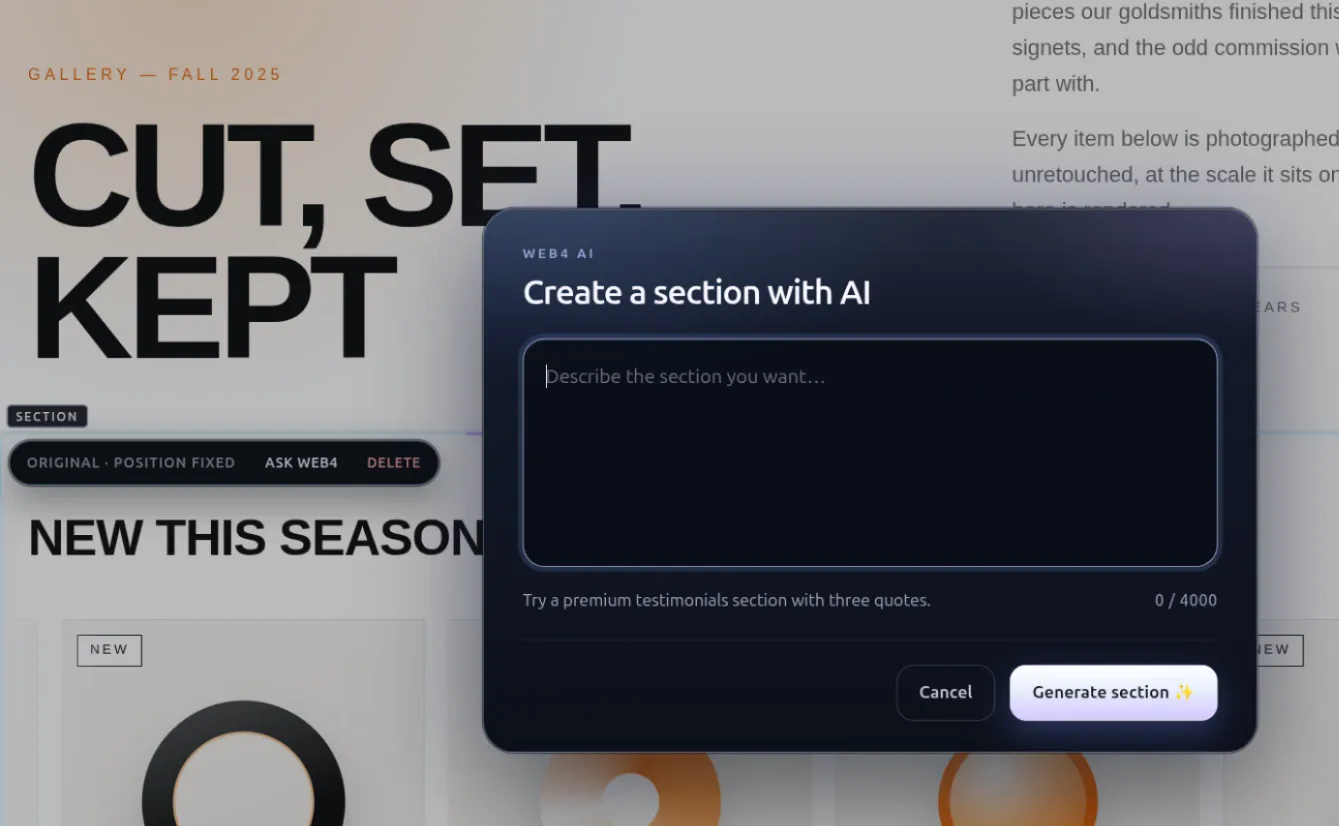
Looking for an AI website builder for your small business? WEB4 AI works inside the same editor, on the site you already have. Ask in text or by voice, and everything it makes stays editable.
Need a new section? Ask.
“Add a testimonials section under the services.”
Need different copy? Ask.
“Rewrite this headline to sound warmer.”
Need a richer page? Ask.
“Build a page for our catering menu.”
Need to change an image or section? Ask.
Select it and ask WEB4 about just that element.
WEB4 AI is part of Founding Access. Free accounts can explore the editor by hand and save up to two projects, but have no AI actions. Direct editing never needs AI; see WEB4 as visual web design software, or start with the free AI website builder plan, or see how to edit your website with AI. For more on how it works, see the WEB4 AI website builder.
07Publish and own
When you’re ready, put the business online.
Publish to a WEB4 address, use a business website builder with a custom domain, or take the files and host them yourself. Your site, your name.
01
Preview
Check desktop, tablet and phone views inside the editor.
02
Publish
Put the site live on a WEB4 address.
03
Your domain
Connect your own domain with step-by-step DNS instructions.
04
Export
Download HTML or PHP files and host the site anywhere.
05
Reopen and edit
Come back any time. Change the site, then publish the update.
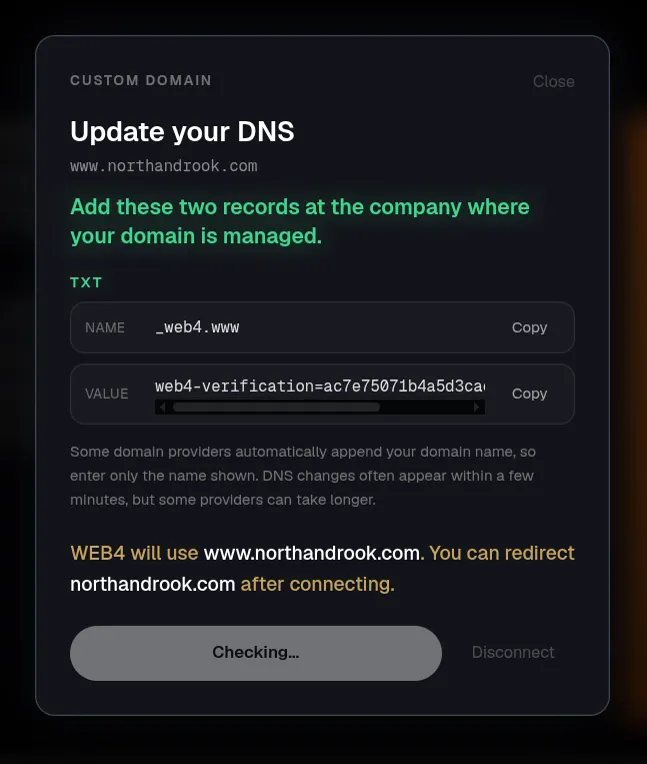
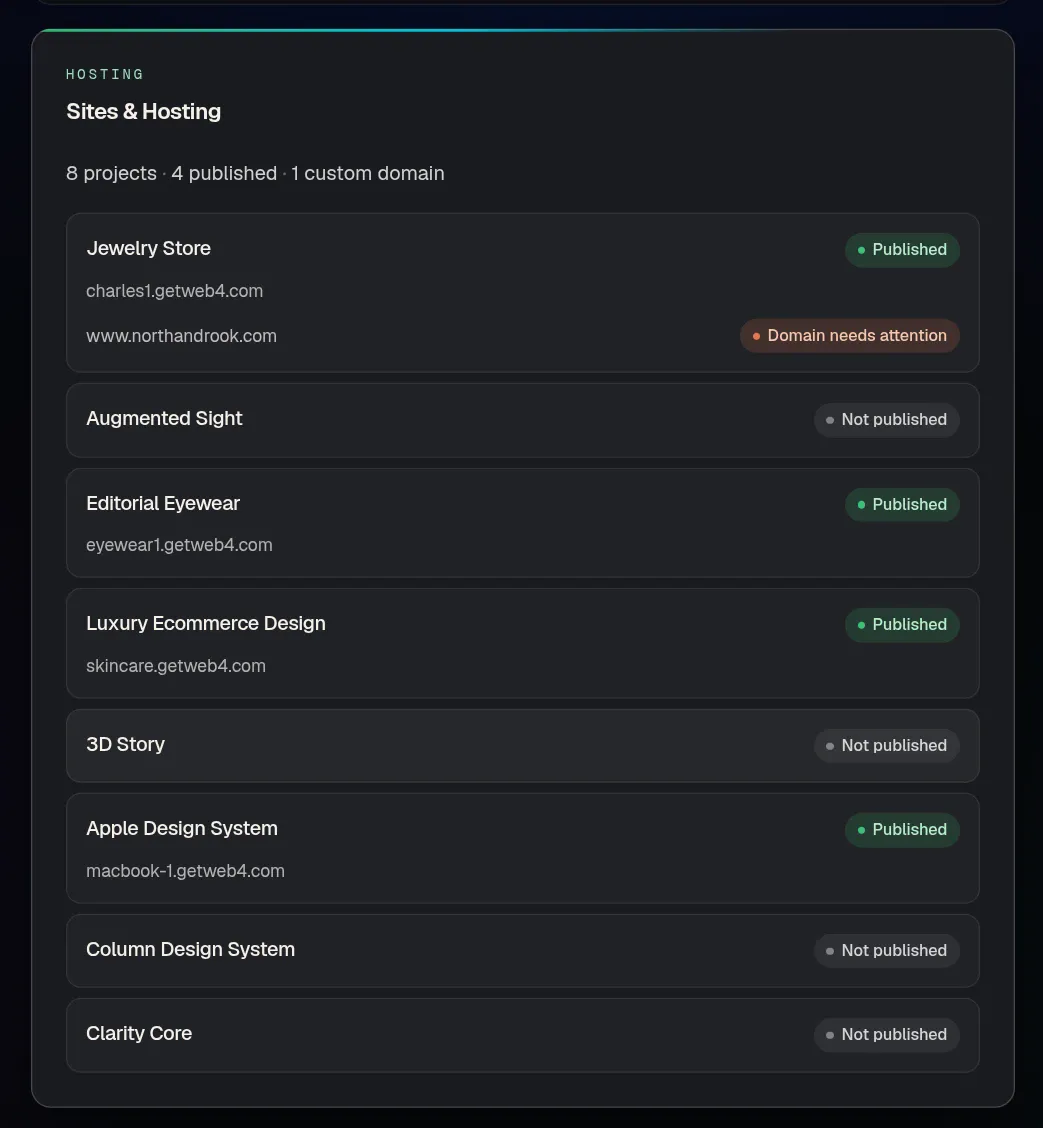
Publishing, custom domains and export come with Founding Access. Founding Access includes the first month of WEB4 Cloud; optional managed hosting after that is priced separately, and you can always export and host elsewhere.
08Who it’s for
A small business website builder for the way you actually work.
Restaurant
Menus change. Events change. Photos change. So the site has to be easy to touch.
Consultant
A credible site with your services, proof and a clear way to get in touch.
Salon or beauty
Visual brand first. Offers second. Booking links when you need them.

Real estate
Services, agents, listings presentation and lead capture, in one polished page.

Agency or creative
Present the work with the kind of design that makes people ask who built it.

Shop
Marketing-site presentation for what you sell, with links to wherever people check out.

Local service
Contractors, cleaners, clinics: say what you do, where, and how to call.

Freelancers and agencies use finished designs to start client sites faster, too. If you’re comparing tools for client work, read what to look for in the best AI website builders.
09Your options
Four ways to get a business website.
Each route is right for someone. Here is how they compare on what small business owners usually care about. Your costs and timeline will depend on your project.
DIY website builder
You assemble it yourself.
- Often lower upfront cost
- More manual assembly
- Often a recurring subscription
- You make every design decision
Freelancer
One person builds it for you.
- Personalized work
- Cost and timing vary a lot
- Future edits may need coordination
- Quality depends on who you hire
Agency
A team designs and builds it.
- Custom strategy and design
- Best for larger or complex needs
- More project overhead
- Usually the biggest commitment
WEB4
Start finished. Edit it yourself.
- Begin from a finished design
- Direct visual editor
- AI when you want it
- $49 Founding Access, one-time
- Publish, your own domain, export
WEB4 doesn’t replace every agency project. For complex custom builds, strategy-led brand work or software, a specialist is the right call.
10An honest fit check
Is WEB4 right for your business?
Often, yes. Sometimes, not yet. Here is where it is strong and where another tool may suit you better.
A good fit
- Brochure sites and landing pages for a business
- Restaurants, salons, clinics and local services
- Consultants, coaches and other professionals
- Portfolios, studios and agencies
- Visual business sites where design quality matters
- Marketing-style shop pages that link out to wherever you take orders
Not necessarily the right tool yet
- Highly custom backend systems or software with user accounts and a database
- Complex SaaS applications or large enterprise systems
- Stores that need their own advanced ecommerce backend, such as inventory or checkout built into the site
- Teams that need to edit from a phone. Visitors can browse on mobile, but the editor needs a tablet, laptop or desktop.
11How to choose
How to choose a website builder for your small business
Looking for the best website builder for small business? The best one is the one that fits how you’ll use it. Ten questions cover most of it, whichever tool you end up with.
Comparing AI tools specifically? Read what to look for in the best AI website builder.
01Does it start from something good?
A blank page puts every design decision on you. Look for finished starting points in your kind of business, and judge them on how they look, not on the demo reel.
02Will it look professional on a phone?
Most visitors will find you on a phone. Check how the site looks at every screen size before you publish, and whether the builder lets you preview that.
03How easy is editing after launch?
Prices, hours, photos and offers change. Try changing one heading and one image. If it takes a support ticket or a rebuild, that is a cost you will pay again and again.
04Can you use your own domain?
A site on your own name builds trust, and the address stays yours if you ever change tools. Check how the DNS setup is explained.
05Can you take the site with you?
Ownership means you can leave. Look for export of real site files, and check whether export is part of the plan you are buying.
06What does it cost over two years?
Separate the software from the extras. A one-time access fee plus optional hosting is a different number than a monthly plan, so add it up over the time you will really use it.
07How fast can you launch?
The best time to publish is while your business idea is still warm. Starting from a finished design usually gets you live faster than assembling pages from nothing.
08Is AI useful, or just a headline?
Good AI helps with the jobs you dislike: a new section, better wording, a new page. It should work inside an editor you can still change by hand.
09Can projects persist?
Close the tab and reopen it tomorrow. You should land in the same project with every edit intact, not at a blank prompt.
10What is the publishing workflow?
Preview, publish, connect the domain, update later. Walk through the whole loop before you commit to a tool.
12Pricing
One software payment. Keep building.
Whether you’re after an affordable website builder for your small business or a one-time payment website builder with no monthly fee, here is exactly what you get and what stays separate.
OCTOBER Founding Sale
$49one-time$99 soon
Founding Access, with 1,000 starter WEB4 AI credits
Additional AI usage is sold separately. Optional managed hosting is separate too.
See full pricing. The editor works on a tablet, laptop or desktop.
- 1,000 starter WEB4 AI credits
- WEB4 AI: sections, copy, images and pages
- Unlimited projects
- Publish to a live WEB4 address
- Connect your own domain
- Export clean HTML and PHP files
- First month of WEB4 Cloud included
Try it before you buy
Free
Free accounts have no WEB4 AI, no publishing and no export. Pick a design and look around first.
- Browse and preview every design
- Sign in with Google
- Save up to two projects
- Explore the real editor by hand
Small business website questions, answered.
Straight answers about cost, editing, domains and what’s included.
What is the best website builder for a small business?
The best choice depends on design quality, ease of editing, publishing, domain support, pricing, export needs and whether you want AI assistance. WEB4 is designed for businesses that want polished starting designs plus an editor they can keep changing.
How much does it cost to build a small business website?
It varies a lot with the route you take: DIY builders, freelancers and agencies are priced very differently, and ongoing edits or hosting can add to the total. With WEB4, Founding Access is a one-time $49 software payment with 1,000 starter AI credits. Additional AI usage and optional managed hosting are separate.
Can I build a business website myself?
Yes. In WEB4 you pick a finished design, open it in the visual editor and change the text, images, links and sections yourself. No coding is needed, and you can ask WEB4 AI for help when you want it.
Can AI build a website for my small business?
AI can generate new sections, copy and pages quickly, especially when it starts from a strong design. In WEB4, AI actions are part of Founding Access. You should still read the result, correct the details for your business and preview it before you publish.
Do I need coding skills to use WEB4?
No. WEB4 is a no-code builder: choose a design, click to edit or describe a change, then publish. If you do write code, you can export the site as HTML or PHP files.
Can I start from a business website template?
Yes. WEB4 has hundreds of finished designs, including restaurants, salons, real estate, consultants, agencies, shops and local services. They are real websites, not wireframes, and you can preview them before you choose.
Can I edit my website after I publish it?
Yes. Reopen the project in the editor, change what you need and publish the update. Saved projects keep your edits.
Can I use my own domain?
Yes. With Founding Access you can publish to a WEB4 address or connect your own domain. WEB4 shows the DNS records to add, step by step.
Can I export my WEB4 website?
Yes. Founding Access unlocks HTML and PHP export, so you can host the files wherever you like.
Does WEB4 charge monthly?
Founding Access is a one-time $49 payment with no monthly software fee. Additional AI usage and optional managed hosting are priced separately, and neither is required to begin.
What does the $49 Founding Access include?
1,000 starter WEB4 AI credits, WEB4 AI access, unlimited projects, publishing, HTML and PHP export, custom-domain connection and the ability to buy more AI credits. It also includes the first month of WEB4 Cloud.
Does WEB4 include hosting?
Founding Access includes the first month of WEB4 Cloud. Managed hosting after that is optional and priced separately. You can also export your files and host the site yourself.
Can I try WEB4 for free?
Yes. You can browse and preview designs, sign in, save up to two projects and explore the real editor by hand. Publishing, export and WEB4 AI need Founding Access.
Does the free version include AI?
No. WEB4 AI actions require Founding Access. The free version is for exploring the designs and the manual editor before you decide.
Can I build more than one business website?
Free accounts can save up to two projects. Founding Access removes that limit, so you can keep a project for each business or each idea.
Can freelancers or agencies use WEB4 for clients?
Yes. Many people start a client site from a finished design, edit it and export the files when the job is done. Check the Terms for the details that apply to your use.
Is WEB4 good for restaurants, consultants and local businesses?
Yes. Those are exactly the brochure-style sites WEB4’s designs are built for: who you are, what you offer, proof and a way to get in touch. If you need a custom backend, such as accounts or inventory, WEB4 is not the right tool yet.
Can I edit WEB4 from my phone?
No. Your visitors can view your website on any phone, and you can browse this page and design previews on one. The editor itself is designed for a tablet, laptop or desktop.
Pick something beautiful.
Put your business online.
Choose a finished design, make it yours, use AI when you need it, and launch while the idea is still warm.
One-time payment · additional AI usage and optional hosting are separate
Learn more about WEB4